TempView for 6CHKTC and 6CHKTC-DAQ
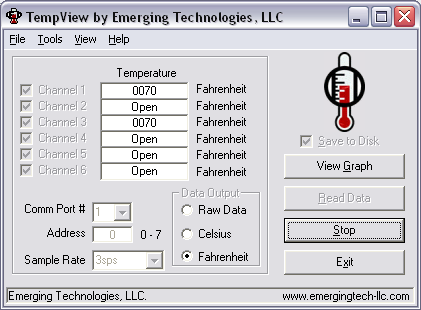
Features:
- Saves thermocouple data to disk with timestamps*
- Graph shows trend of thermocouple channels over last 50 samples*
- Make single requests or acquire data as quickly as 3sps per channel
- Display temperature in raw data (0-4095), Celsius (0-1023), or Fahrenheit (32-1873)
- Saves preferences for convenience
Description:
TempView is a software application that allows you to easily read, display,
and store data acquired from Emerging Technologies, LLC’s six channel
thermocouple card (6CHKTC) or Type "K"
Thermocouple Data Acquisition Module (6CHKTC-DAQ).
It allows you to take individual samples of data or to continually acquire data on all 6
channels at sample rates of 3sps, 2sps, 1sps, 6spm, 2spm, 1spm, 6sph, 2sph, and 1sph.
By clicking the “View Graph” button you can view a graph of the temperature trend of
selected channels over the last 50 samples. Additionally, you can print the current
view of the graph to the default printer with a simple one-click interface.
When the “Save to Disk” option is selected, data is saved to a comma-separated-value
(CSV) file with a timestamp for each sample. Data is stored in the following format:
“date,time,temperature type, ch1, ch2, ch3, ch4, ch5, ch6, cr” where temperature type
is either an “r”, “c”, or “f” to indicate raw, Celsius, or Fahrenheit, and “cr” is a
carriage return. If a channel is open, the word “open” will be stored to the data
file under the appropriate channel heading. Similarly, if a channel is disabled
(unchecked) the word “disabled” will be stored under the appropriate heading.
Using a spreadsheet program such as Microsoft Excel, it is easy to graph the acquired
data and to calculate trends over time and other useful information.
Download Now!
TempView can be downloaded free of charge by clicking here.
To unlock advanced features such as data logging and graphing,
you may purchase a license for $19.95 by clicking here.
*Full version of TempView required.
|